Park it for later.
An infinite canvas for the side tasks, ideas and bugs that come up while you work with an AI agent. Your agent parks each one with enough context to pick it up cold, and a link back to the session where it was born.
Two commands and your agent can park things:
$ curl -fsSL https://parkboard.jjato.com/install.sh | sh
$ park login
irm https://parkboard.jjato.com/install.ps1 | iex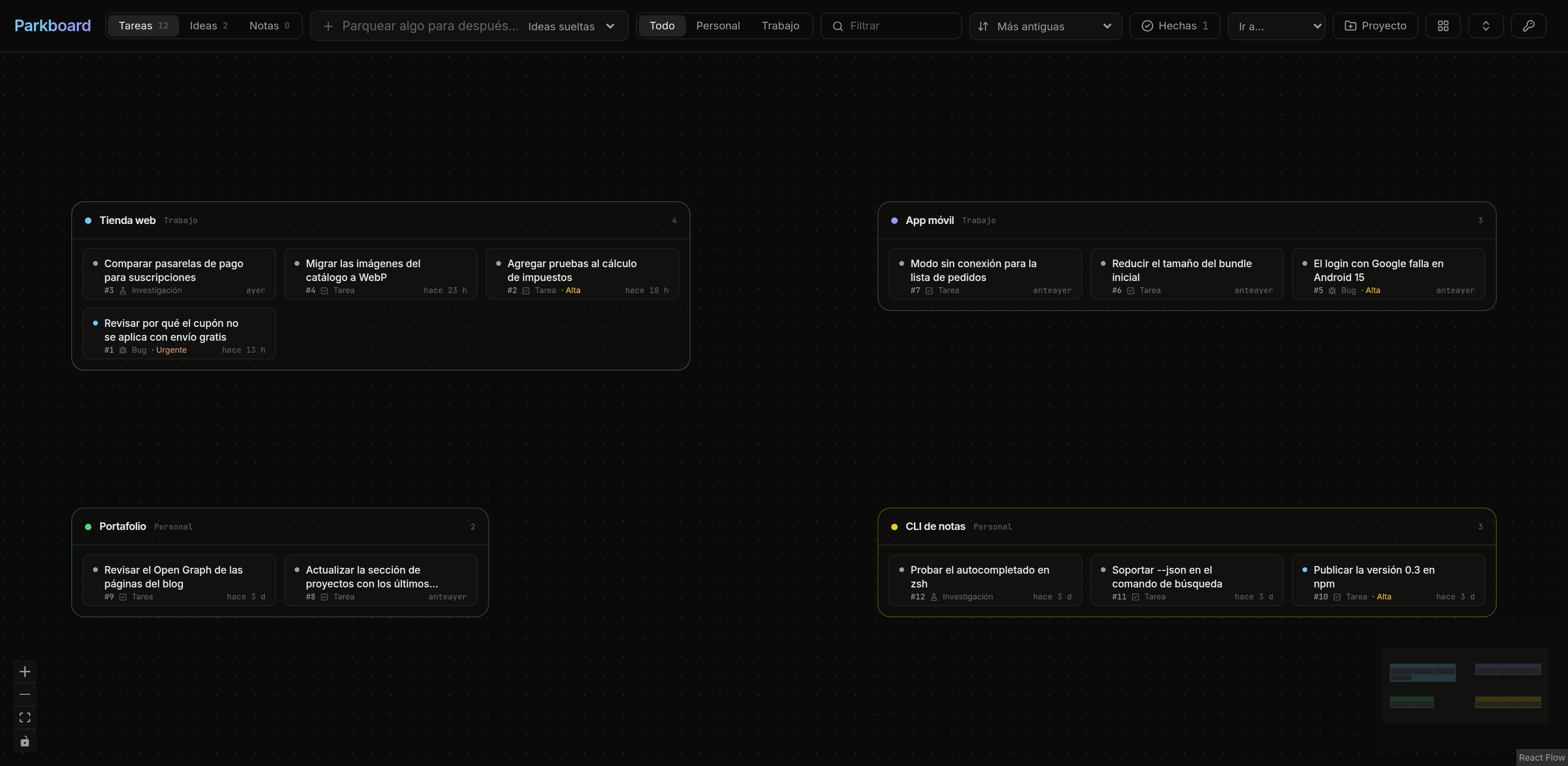
Why
One task keeps spawning others: a bug you spot while fixing something else, an idea for later, a check to run before shipping. You stay on the main task, and by the end of the session those side tasks are lost in the conversation. Parkboard keeps them in one place.
How it works
- 01
You say “let’s leave that for later”
Mid-session, to Claude Code, Codex or any agent with a shell.
- 02
The agent runs park add
Title, project, kind, priority, notes to resume it cold, and the session id.
- 03
It lands on your canvas
Grouped by project, one card away from the session it came from.
$ park add "Check the coupon with free shipping" -p shop --kind bug --priority urgent
✓ parked #13 Check the coupon with free shipping (shop)
Start in a minute
No repo to clone: your agent can do the whole setup, or you can do it in three steps.
The easy way: ask your agent
Paste this into Claude Code, Codex, Gemini CLI, Cursor or any agent with a terminal. It installs the CLI, opens your browser so you authorize it, and saves a standing rule in its own instructions, so it parks things without you reminding it.
Set up Parkboard for me: read https://parkboard.jjato.com/setup.md and follow it step by step.
Or by hand
- 01
Install the CLI
One file, no dependencies. Needs Node 20 or newer. The first line is for macOS, Linux and WSL; the second, for Windows PowerShell.
$ curl -fsSL https://parkboard.jjato.com/install.sh | shPS> irm https://parkboard.jjato.com/install.ps1 | iex - 02
Connect it to your board
It opens the browser, you sign in with Google and authorize the terminal. Done: the key is saved.
$ park login - 03
Give your agent the rule
Paste this into the instructions it loads every session: ~/.claude/CLAUDE.md, ~/.codex/AGENTS.md, ~/.gemini/GEMINI.md or your agent's rules.
<!-- parkboard:start -->
## Parkboard (things for later)

My pending tasks, ideas and bugs live on my Parkboard (https://parkboard.jjato.com), managed with the `park` CLI (`park schema` describes every command).

- When I say "let's leave that for later", "park it", "note that", or mention a task, bug or idea we won't do in this session, park it without asking:
  `park add "<actionable title>" -p <project> --kind task|idea|bug|research|note --priority low|medium|high|urgent --notes "<context to pick it up cold>" --summary "<what we were doing in this conversation>"`
  The project is the slug of the repo or topic (`park projects` lists them; a new one is created on its own). An idea that belongs to no project goes without `-p`. The CLI detects the repo from the git remote, and in Claude Code and Codex it also attaches this session by itself; other agents can pass `--agent <name> --session-id <id>` when they know their session id.
- Warnings and facts worth not forgetting, that are not tasks, go as `--kind note` with `-p <project>`.
- Search first with `park ls -q "<word>"` so the same thing is not parked twice.
- When I mention a card by number ("card 12", "#12"), read it first with `park show 12`, work on it, and run `park done 12` when it is finished. To resume a project, `park ls -p <project>` shows what is open.
- After parking, tell me in one line: 🅿️ parked #<number> <title> (<project>).
<!-- parkboard:end -->
What you get
Infinite canvas
Projects are groups that fit their cards; drag a card to move it between projects.
Tasks, Ideas and Notes
One view at a time, so ideas and notes do not crowd the work. Personal and work areas.
Born in a session
Every card remembers the agent, session and folder, so you can resume the conversation.
CLI for agents
park has no dependencies: JSON when piped, --dry-run on writes, park schema for agents.
Sign in from the terminal
park login opens the browser and saves a key of its own, stored as a SHA-256 hash and revocable from the web.
Done, out of the way
Closed cards leave the canvas for a Done panel, grouped by day, one click from reopening.
Your board is yours alone
What you park is encrypted before it reaches the database, and nobody but you sees your board.
Encrypted at rest
Titles, notes, links, tags, project names and session details are stored with AES-256-GCM. A copy of the database cannot be read without the key, which is kept apart.
Only for you
Each account has its own board, invisible to everyone else. No ads, no selling your data, no training AI models with it.
Take it with you
park export saves your whole board as JSON, and you can delete everything whenever you want.
Rather host it yourself?
The code is public: run your own board on your own servers in a few minutes, then point the CLI at it with park login --url.
View on GitHub$ git clone https://github.com/Jjat00/parkboard.git $ pnpm install $ cp .env.example .env $ pnpm exec prisma migrate deploy $ pnpm dev
If it helps, leave a star
Parkboard is free and open source. A star on GitHub helps more people find it.
Star the repo